
PLATFORM COMPARISON
WooCommerce vs Shopify: Which E-Commerce Platform Wins in 2026?
Choosing between WooCommerce and Shopify shapes your store’s cost, flexibility, and growth path for years to come. Here’s an honest, practical breakdown from the HaxCode team to help you decide.
If you’re planning to launch or migrate an online store, you’ve almost certainly landed on this question. WooCommerce and Shopify power a huge share of the world’s e-commerce sites, but they’re built on completely different philosophies — one is an open-source plugin you self-host, the other a fully managed SaaS platform. That single difference cascades into everything else: pricing, control, scalability, and how much technical work falls on your plate.
At HaxCode, we build and maintain stores on both platforms for clients across India, North America, and beyond, so this comparison is drawn from real project experience rather than marketing pages.
The Quick Comparison
WooCommerce
Full Ownership
You own the code, the data, and the hosting. Nothing is rented.
No Monthly Platform Fee
Core plugin is free; costs come from hosting, plugins, and dev time.
Unlimited Customization
Any PHP/WordPress developer can extend or rebuild any part of it.
You Manage the Stack
Hosting, security patches, backups, and updates are your responsibility.
Shopify
Fully Managed
Hosting, security, PCI compliance, and uptime are handled for you.
Predictable Monthly Cost
Flat subscription plans, plus transaction fees on non-Shopify Payments.
Fast to Launch
Store can go live in days with themes and apps, minimal dev needed.
Platform-Bound
You're building on rented infrastructure — Shopify's rules apply.
Cost & Pricing
Shopify charges a flat monthly subscription (Basic, Shopify, Advanced, or Plus tiers), which covers hosting, SSL, and support. If you don’t use Shopify Payments, a transaction fee of roughly 0.5–2% applies on top of your payment gateway’s own fees.
WooCommerce itself is free, but real cost lives in hosting (shared, VPS, or managed WooCommerce hosting), premium plugins for shipping, subscriptions, or advanced SEO, and developer time for setup and maintenance. For a lean store, WooCommerce can be cheaper long-term; for a hands-off store, Shopify’s all-in-one fee is often simpler to budget.
Ease of Use & Setup
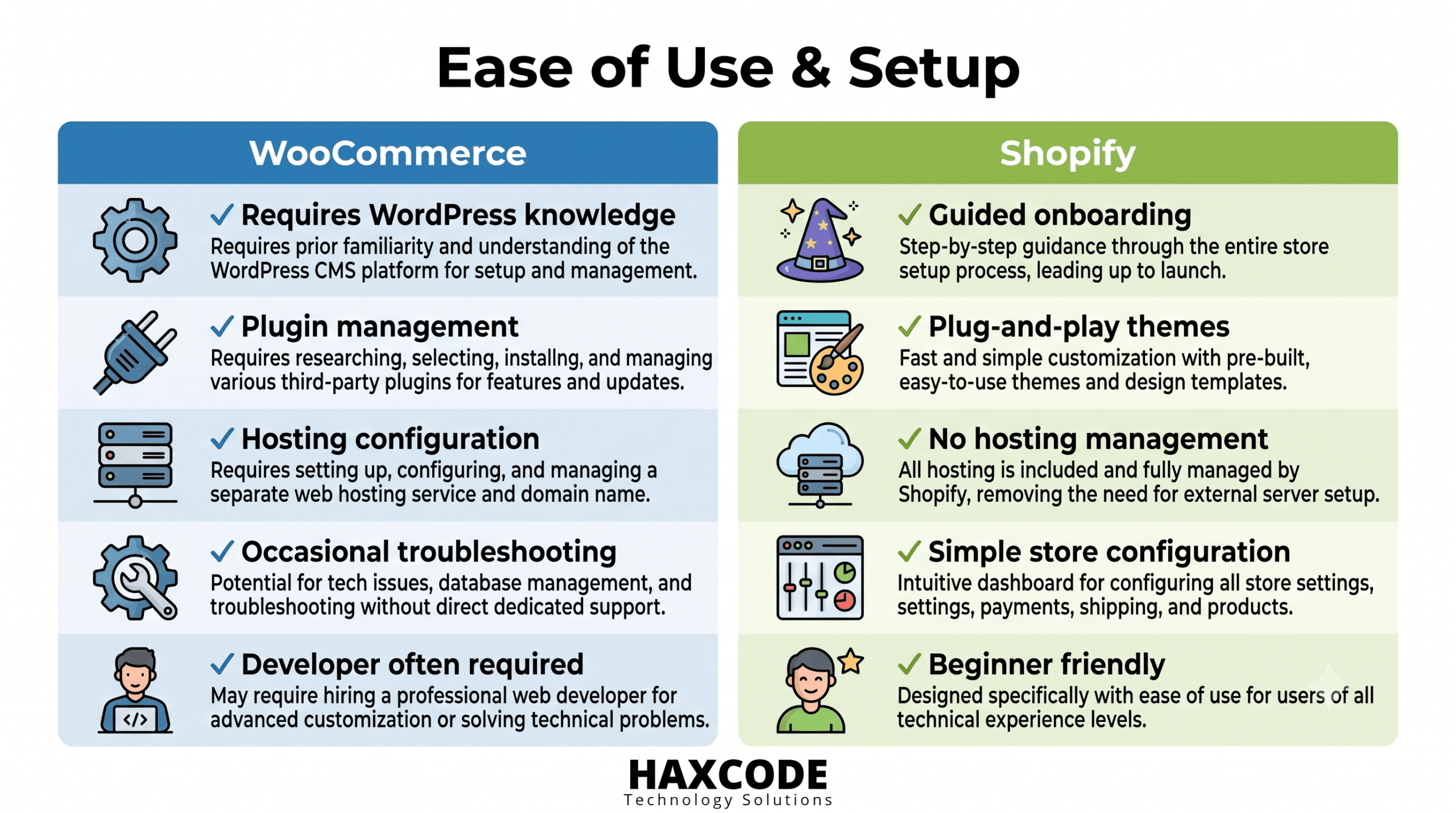
Shopify wins here for non-technical founders. The admin panel is guided, themes are plug-and-play, and most day-to-day tasks need no code. WooCommerce requires comfort with WordPress — installing plugins, managing conflicts, and occasionally troubleshooting PHP or hosting errors, which usually means budgeting for a developer or agency.

Customization & Flexibility
WooCommerce, being built on WordPress, has essentially no ceiling — custom checkout flows, bespoke product logic, multi-vendor marketplaces, and deep ERP integrations are all achievable with the right developer. Shopify is highly capable through its app ecosystem and Liquid templating, but certain deep backend changes (checkout customization below the Plus tier, for example) are restricted by design.
Hosting & Security
Shopify handles hosting, SSL, PCI-DSS compliance, and DDoS protection as part of the subscription — there’s little for the store owner to configure. WooCommerce hands you full control, but also full responsibility: choosing reliable hosting, keeping WordPress core and plugins patched, and setting up backups and firewalls. This is exactly where many WooCommerce stores run into trouble if they’re self-managed without technical support.
SEO & Content Marketing
Both platforms can rank well. WooCommerce has an edge for content-heavy SEO strategies because WordPress’s blogging and taxonomy tools are more mature, and URL structures, schema, and technical SEO are fully editable. Shopify has closed some of this gap with better native SEO controls in recent years, but certain URL structures (like the fixed /products/ and /collections/ paths) can’t be changed, which occasionally matters for large catalogs and cannibalization management.
Scalability & Performance
Shopify scales traffic spikes automatically since it runs on shared managed infrastructure — useful during flash sales or seasonal peaks. WooCommerce can scale just as well, but performance depends entirely on your hosting choice and optimization work (caching, CDN, database tuning). For very large catalogs or high-traffic stores, both platforms need deliberate architecture — WooCommerce through server-side tuning, Shopify through Plus-tier features or careful app management.
So, Which Should You Choose?
Choose WooCommerce if…
You need deep customization
Complex product logic, marketplaces, or custom integrations.
You want full data ownership
No vendor lock-in, complete control of hosting and code.
You already run on WordPress
Content and store live under one roof.
Choose Shopify if…
You want to launch fast
Minimal technical setup, guided admin experience.
You'd rather not manage hosting
Security, uptime, and PCI compliance handled for you.
You value predictable costs
One flat subscription instead of variable dev/hosting spend.
GOT QUESTIONS?
WooCommerce vs Shopify: Frequently Asked Questions
Straight answers to the most-searched WooCommerce vs Shopify questions — cost, SEO, security, speed, dropshipping, digital products, and more.
Is WooCommerce the same as WordPress, and how does it compare to Shopify?
No — WooCommerce is a free plugin you install on top of WordPress, not a platform of its own. Shopify, by contrast, is a fully hosted platform that isn’t tied to any CMS. In short: WordPress + WooCommerce gives you a content-and-commerce site under one roof with full code access, while Shopify gives you a store-only environment that’s managed end-to-end for you.
What are the main pros and cons of WooCommerce vs Shopify?
WooCommerce’s pros are full ownership, no monthly platform fee, and unlimited customization; its main con is that you’re responsible for hosting, security, and updates. Shopify’s pros are fast setup, managed infrastructure, and predictable pricing; its main con is less backend flexibility and transaction fees if you skip Shopify Payments. Neither is universally ‘better’ — the right pick depends on your technical resources and growth plans.
How does WooCommerce vs Shopify vs BigCommerce compare?
BigCommerce sits between the two: like Shopify, it’s a fully hosted SaaS platform, but it includes more native features (multi-currency, advanced catalog rules) without needing as many paid apps. WooCommerce still wins on raw customization and cost control since it’s open-source, while Shopify generally offers the smoothest app ecosystem and design experience. BigCommerce is worth shortlisting if you want Shopify-like convenience with fewer app-fee surprises.
Which is better for SEO, Shopify or WooCommerce?
WooCommerce has historically had the edge because WordPress’s blogging, taxonomy, and plugin tools (Yoast, Rank Math) give you granular control over URLs, schema, and content structure. Shopify has closed much of that gap in 2025–2026 with native structured data, auto-generated sitemaps, and better meta-field controls, though its URL structure (/products/, /collections/) still can’t be fully customized. For content-heavy SEO strategies, WooCommerce still tends to pull ahead; for straightforward product SEO, Shopify is now very competitive.
Is Shopify or WooCommerce better for a small business?
Small businesses that want to launch quickly with minimal technical overhead usually do better on Shopify — it’s guided, managed, and predictable in cost. Small businesses with some technical support (in-house or an agency) who want to save on recurring fees and control every detail often prefer WooCommerce. If budget is tight but you have developer access, WooCommerce can be meaningfully cheaper long-term.
Which platform has a better conversion rate, Shopify or WooCommerce?
There’s no single definitive winner — conversion rate depends far more on store design, page speed, trust signals, and checkout friction than on the platform itself. Shopify’s checkout is highly optimized out of the box, which helps stores that haven’t invested in custom checkout work. WooCommerce stores can match or exceed that with proper optimization (fast hosting, a lean checkout plugin, and page-speed tuning), but it takes deliberate effort rather than coming for free.
How does WooCommerce vs Shopify cost compare?
Shopify charges a flat monthly subscription (roughly $39–$399+ depending on the tier) that bundles hosting, SSL, and support, plus a transaction fee if you don’t use Shopify Payments. WooCommerce itself is free, but real costs come from hosting, premium plugins, and developer time — typically $20–$100+/month for a lean store, scaling with complexity. At low-to-moderate scale WooCommerce is often cheaper; at high scale, Shopify’s bundled infrastructure can become the more cost-efficient option.
Which is better for dropshipping, WooCommerce or Shopify?
Shopify is the more common choice for dropshipping because of its mature app ecosystem (Oberlo-successor apps, DSers, Spocket) and quick store setup, which suits sellers who want to launch and iterate fast. WooCommerce can absolutely run a dropshipping business too, using plugins like AliDropship or WooDropship, and gives more control over branding and checkout — but it needs more setup work. For a first dropshipping test, Shopify’s speed-to-launch is usually the deciding factor.
Which is better for selling digital products, WooCommerce or Shopify?
WooCommerce (with Easy Digital Downloads or its own downloadable product type) offers deeper control over licensing, access rules, and content delivery, making it popular with course creators and software sellers. Shopify supports digital products well through apps like SendOwl or Digital Downloads, and is simpler to set up, but some advanced licensing logic needs a paid app. If digital delivery rules are complex, WooCommerce generally offers more native flexibility.
Which platform is better for ecommerce overall — WooCommerce or Shopify?
Both are top-tier choices and together power a large share of the world’s online stores, so ‘better’ really depends on your priorities. Choose WooCommerce if control, customization, and content integration matter most; choose Shopify if speed, managed infrastructure, and predictable costs matter most. Store size, technical resources, and growth plans should drive the decision more than any general ranking.
What are the fees for WooCommerce vs Shopify?
Shopify’s fees include the monthly subscription plus a transaction fee (roughly 0.5–2%) on orders that don’t use Shopify Payments, on top of standard card-processing rates. WooCommerce has no platform fee at all — you only pay your payment gateway’s processing fee (e.g., Stripe, Razorpay) plus whatever premium plugins or hosting plan you choose. This is one of the clearest cost differences: WooCommerce avoids the extra transaction-fee layer entirely if you self-host well.
WooCommerce vs Shopify — which one is actually better?
Neither platform is objectively ‘better’ in every scenario — they’re built on different philosophies. Shopify is the stronger pick when you want a managed, fast-to-launch store with predictable costs; WooCommerce is the stronger pick when you want full ownership, deep customization, and lower long-term costs with developer support. The right answer depends on your budget, technical resources, and how much control you need over the backend.
Which is faster, WooCommerce or Shopify?
Shopify delivers strong performance out of the box — around a 1.5–2 second average page load — because it runs on managed, globally distributed infrastructure. WooCommerce can match or beat that, but only with deliberate optimization: quality hosting, caching, a lean plugin stack, and CDN configuration; unoptimized WooCommerce stores are often the slower of the two. In short, Shopify is faster by default, while WooCommerce’s speed ceiling depends entirely on setup quality.
What is the market share of WooCommerce vs Shopify?
Market-share figures vary widely by source and methodology: some trackers put WooCommerce ahead by raw live-store count, while others (sampling only high-traffic sites) show Shopify leading among premium, high-revenue stores. As a rough picture for 2026, WooCommerce tends to lead in total number of active stores worldwide, while Shopify leads in gross merchandise volume and presence among large, high-traffic merchants. Because the two platforms are measured differently (plugin installs vs. hosted checkouts), always check the source before quoting an exact percentage.
How do WooCommerce and Shopify compare on security?
Shopify handles PCI-DSS compliance, SSL, and infrastructure security as part of its managed subscription, so there’s very little for a store owner to configure. WooCommerce gives you full control but also full responsibility — you (or your host) must handle SSL, firewalls, malware scanning, and timely core/plugin updates. Shopify is the lower-maintenance option for security; WooCommerce can be equally secure but requires an actively maintained hosting and update routine.
What do the latest WooCommerce vs Shopify statistics show?
Recent data shows both platforms powering millions of active stores, with WooCommerce generally leading in raw store count and Shopify leading in high-traffic sites and total transaction volume. Average conversion rates on both platforms sit in a similar low-single-digit range, with top-performing stores well above the average regardless of platform. Because different research firms track different data sets (installs vs. active checkouts vs. top-traffic sites), treat any single statistic as directional rather than exact.
What's new in the WooCommerce vs Shopify comparison for 2026?
In 2026, Shopify has narrowed the SEO and structured-data gap with native schema markup and better meta controls, while WooCommerce has kept its edge in content-driven SEO and deep customization. Both platforms are investing in AI-assisted store features and, for Shopify, deeper multi-market and B2B tools. The core trade-off hasn’t changed — flexibility and ownership (WooCommerce) vs. managed convenience and speed (Shopify) — but both platforms are closing each other’s historical gaps.
So — Shopify or WooCommerce — which one is best for you?
Pick Shopify if you want to launch quickly, don’t want to manage hosting or security, and prefer predictable monthly costs. Pick WooCommerce if you already run WordPress, need deep customization or content-commerce integration, and have (or can hire) developer support to manage the backend. If you’re unsure, map out your growth plan for the next 2–3 years first — the platform that fits your team’s technical capacity today should also make sense at your projected scale.
Not Sure Which Fits Your Business?
HaxCode builds and migrates stores on both WooCommerce and Shopify. Tell us about your business and we’ll recommend the right platform — no guesswork.